
 Cloud made simple!
Deploy your apps without serverless nightmares
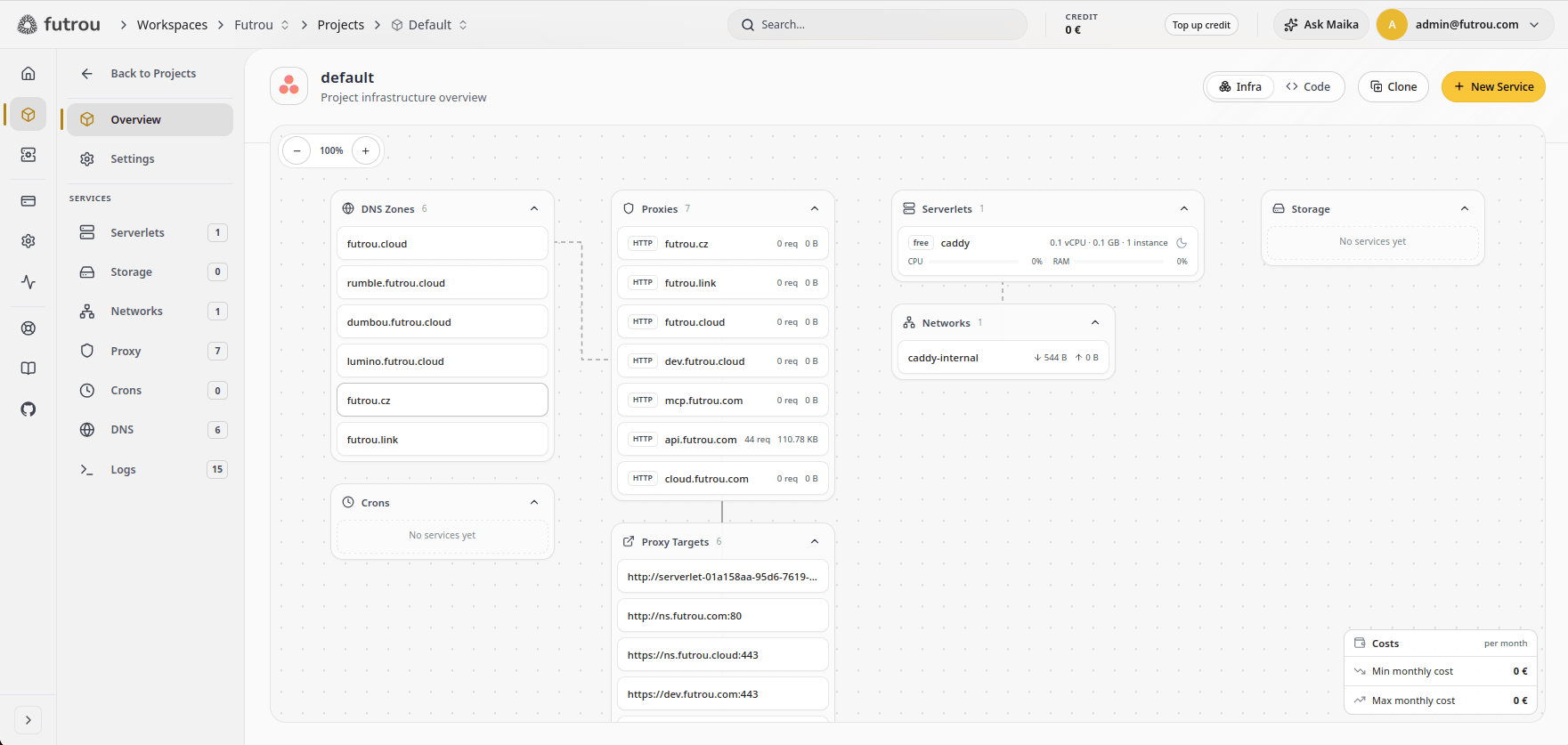
- Hourly billing Pay only while it runs
- Scalable plans Resize as you grow
- Autoscaling Down to zero when idle
- Self-healing Automatic restarts









Every service you might need
Futrou is all-in-one cloud for your fullstack apps
Serverlets
Auto-scaling containers running inside managed microVMs.
Explore Serverlets →Storage
Fast NVMe SSD storage for your services, mounted as a volume or reached through an S3-compatible API.
Explore Storage →Proxy
Configurable HTTPS, TCP, and UDP proxy with rules and certificates.
Explore Proxy →Networks
Private networks with custom subnets, connecting your services across servers over encrypted tunnels.
Explore Networks →DNS
Distributed authoritative DNS servers for your domains.
Explore DNS →Crons
Scheduled tasks that run reliably with your project.
Explore Crons →Loved by both humans and AI agents
$ curl -fsSL https://futrou.com/install.sh | bash$ curl -fsSL https://futrou.com/install.sh | bash$ irm https://futrou.com/install.ps1 | iex$ npm install -g futrou Use Futrou from your terminal, your pipeline or your coding agent. Every one of them runs on the same API.
curl -fsSL https://futrou.com/install.sh | bash⠋⠙⠹⠸⠼⠴⠦⠧⠇⠏Checking versions...⠋⠙⠹⠸⠼⠴⠦⠧⠇⠏Installing Futrou CLI v2.0.21...Futrou CLI v2.0.21 installedRun 'futrou --help' to get startedfutrou loginPlease visit the below link in your browser and follow the instructions: https://api.futrou.com/v2/auth/cli/qbZiuz_zH1dMmfVKpeUY⠋⠙⠹⠸⠼⠴⠦⠧⠇⠏Waiting for authentication (4:56 remaining)...curl -fsSL https://futrou.com/install.sh | bash⠋⠙⠹⠸⠼⠴⠦⠧⠇⠏Checking versions...⠋⠙⠹⠸⠼⠴⠦⠧⠇⠏Installing Futrou CLI v2.0.21...Futrou CLI v2.0.21 installedRun 'futrou --help' to get startedfutrou loginPlease visit the below link in your browser and follow the instructions: https://api.futrou.com/v2/auth/cli/qbZiuz_zH1dMmfVKpeUY⠋⠙⠹⠸⠼⠴⠦⠧⠇⠏Waiting for authentication (4:56 remaining)...irm https://futrou.com/install.ps1 | iex⠋⠙⠹⠸⠼⠴⠦⠧⠇⠏Checking versions...⠋⠙⠹⠸⠼⠴⠦⠧⠇⠏Installing Futrou CLI v2.0.21...Futrou CLI v2.0.21 installedRun 'futrou --help' to get startedfutrou loginPlease visit the below link in your browser and follow the instructions: https://api.futrou.com/v2/auth/cli/qbZiuz_zH1dMmfVKpeUY⠋⠙⠹⠸⠼⠴⠦⠧⠇⠏Waiting for authentication (4:56 remaining)...npm install -g futrou⠋⠙⠹⠸⠼⠴⠦⠧⠇⠏Checking versions...⠋⠙⠹⠸⠼⠴⠦⠧⠇⠏Installing Futrou CLI v2.0.21...Futrou CLI v2.0.21 installedRun 'futrou --help' to get startedfutrou loginPlease visit the below link in your browser and follow the instructions: https://api.futrou.com/v2/auth/cli/qbZiuz_zH1dMmfVKpeUY⠋⠙⠹⠸⠼⠴⠦⠧⠇⠏Waiting for authentication (4:56 remaining)...claude mcp add --transport http futrou https://mcp.futrou.com⠋⠙⠹⠸⠼⠴⠦⠧⠇⠏Connecting to mcp.futrou.com...connected 4 tools · deploy, logs, scale, statusscale acme-api to 4 instances⠋⠙⠹⠸⠼⠴⠦⠧⠇⠏services.scale · acme-api · 2 → 4done 4 instances healthy in 11sclaude mcp remove futrouremoved futrou1workspace: acme2project: website3serverlets:4 web:5 image: ghcr.io/acme/web:1.4.26 maxInstances: 37 needs: [db:healthy]8 db:9 image: postgres:1710proxies:11 www.example.com:12 target: web13 port: 8080futrou up -yUsing config: futrou.yamlChanges:Create (3) + serverlet: "db" + serverlet: "web" + proxy: "www.example.com"⠋⠙⠹⠸⠼⠴⠦⠧⠇⠏Applying changes...✓ Applied 3 change(s).curl -sX POST https://api.futrou.com/v1/services \ -H "Authorization: Bearer $FUTROU_TOKEN" \ -d '{"repo":"acme/api","region":"eu-central-1"}'⠋⠙⠹⠸⠼⠴⠦⠧⠇⠏Creating service...201 Created{ "id": "svc_8fk2", "status": "running" }


Works with the coding agents you already use
Don't give your agent just a sandbox VM. Give it a full-blown cloud and let it manage the whole infrastructure for you.
Security baked in
Every layer of Futrou is built with security and zero trust in mind, from the network up to each workload. No mystery endpoints on private IPs that open a way in.
-
Zero trust by default
Every server proves itself with its own key before it joins a network.
-
No mystery endpoints
Services live on private IPs. The only way in is a proxy you can see.
-
Encrypted tunnels
Servers link over encrypted tunnels, no open ports are needed.
-
Isolated microVMs
Every serverlet gets its own microVM and never shares a kernel.
-
Signed releases
All Futrou software is signed and verified on install.
-
WAF and anti-DDoS
On Futrou Cloud, public traffic passes a WAF and DDoS protection first.
Always predictable pricing, no hidden costs
Futrou shows the price before every step, and scales only up to the limit you are willing to accept. No more serverless billing horror stories. See pricing
-
01Pick a plan
The price per hour is on every plan before you choose.
-
02Set scaling cap
Choose how far autoscaling may go, and see the maximum price right away.
-
03Traffic grows
Futrou keeps scaling your services only up to the configured limit.
-
04No hidden costs
No surcharges and no overage. The invoice matches what you approved.
Bring your own servers, keep the cloud benefits
Connect your servers to Futrou Cloud and run your apps entirely on your infra with zero additional cost. Same platform, same API, your hardware.
$ curl -fsSL https://futrou.com/nasua/install.sh | bash
✓ Nasua installed
$ nasua cloud join --api-url https://api.futrou.com <join-token>
✓ Joined Futrou Cloud
$ curl -fsSL https://futrou.com/nasua/install.sh | bash
✓ Nasua installed
$ futrou --api-url https://nasua.example.com serverlet ls
✓ 3 serverlets running- 3 servers online
- Encrypted P2P tunnels up
- Managed from Futrou Cloud
- 3 servers online
- The CLI talks to your servers directly
- No Futrou Cloud account needed
-
A new server in one command
Install Nasua and join the server to your workspace in one step.
-
Everything in one place
Metrics, logs and a browser console in a single place in Futrou Cloud.
-
No public IP required
Encrypted P2P tunnels work even behind NAT, no firewall changes are required.
-
Zero-downtime upgrades
Futrou upgrades in place without dropping a single request.
Everything you might want to know about Futrou
The things people ask us before they sign up.
What is Futrou?
Futrou is PaaS cloud platform that simplifies deploying applications. Unlike traditional shared hosting, Futrou lets you deploy any containerized application without need to build your own Docker images — PHP, Node.js, Go, Ruby, and more — with a serverless-like experience and no infrastructure hassle, flexible and always predictable billing per hour.
Can I self-host Futrou?
Yes — Futrou is one of the few PaaS platforms you can freely self-host. There are three ways to run it:
- Public Cloud — Futrou Cloud on
cloud.futrou.commanages the servers and infrastructure for you, so you can just focus on development and shipping. Every project deploys into its own isolated microVM for strong multi-tenant security, with a built-in WAF and anti-DDoS protection. Just sign up and immediately deploy. - Hybrid Cloud — Futrou Cloud on
cloud.futrou.comallows you to bring your own servers into your workspace, combining them with Futrou's public infrastructure however you like. Deploys still go through Futrou Cloud exactly as before, with no visible difference — and if one of your servers goes down, Futrou can fail traffic over to its public infrastructure and back again once it recovers. Get the best of both worlds. - Private Cloud — Futrou can be run in standalone mode on your own domain, fully disconnected from Futrou Cloud. Every deployment and every request goes straight to your own hardware — the Futrou CLI and REST API work exactly the same.
Is Futrou just another AWS wrapper?
No. Futrou's public regions run on Futrou's own servers, not resold AWS, GCP, or Azure capacity — and the same Futrou Nasua orchestrator runs the platform whether it's on Futrou's hardware or yours. That's what makes hybrid and fully self-hosted deployments possible: there's no cloud provider underneath to wrap.
What does Futrou offer?
Everything you need to run a full-stack application — backend, frontend, and everything in between — as separate services you can mix and match per project:
- Serverlet — compute for your container image, autoscaling with load and able to scale to zero when idle.
- Proxy — routes traffic to a serverlet or other backend over HTTP, TCP, or UDP.
- DNS — manage DNS zones and records for your domains.
- Volume — persistent storage volumes attached to a serverlet that survive restarts.
- Cron — a scheduled job that runs on a timer.
What frameworks and languages can Futrou run?
Node.js, Bun, Deno, PHP, Python, Ruby, Go, .NET, Lua, and Perl, along with the frameworks built on them — Next.js, Laravel, Django, Rails, and the rest. If it runs in a container, it can run on Futrou.
How do I deploy to Futrou?
Every serverlet runs a Docker image — your own, published to any registry, or a Futrou base image you build on top of. There's no buildpack step and no source upload: deploy with the Futrou CLI, the REST API, or straight from the dashboard, locally or from CI.
Can I use my own domain?
Yes. Every serverlet gets a free *.futrou.cloud subdomain the moment it's created, with TLS included and nothing to configure. Bring your own domain whenever you're ready — Futrou requests and renews the certificate for you.
Where does Futrou run — can I pick a region?
Futrou Cloud gives you access to Futrou's own public regions out of the box, or you can leave placement on Auto and let Futrou pick one for you. You can also connect your own servers as a private region and manage them through the same dashboard, billing, and team access as everything else.
How does billing work?
Futrou Cloud uses flexible hourly billing for most of the services. You pay only for the public cloud infrastructure resources you actually use, metered hourly and deducted from your credit balance, with auto top-up options based on your usage. When credit auto top-up fails, services are stopped and after a graceful period permanently deleted. Futrou doesn't apply any additional charges and doesn't support overage payments.
All services deployed and running on custom private servers in hybrid cloud mode are completely free of charge. Self-hosted Futrou instances in private cloud standalone mode don't have or apply any billing logic. Futrou software for self-hosted instances is available for free for both personal and commercial usage. See Futrou Licenses.
Does Futrou use Kubernetes or Nomad?
No. Futrou runs on its own lightweight cloud orchestrator, Futrou Nasua, built specifically for platform needs. Futrou Nasua is inspired by Nomad and free to use for both personal and commercial purposes.
Does Futrou offer an MCP server?
Yes. Futrou provides a remote MCP server at mcp.futrou.com, so any compatible AI client can manage your workspace, projects, and services using natural language.
Does Futrou offer a CLI?
Yes. The Futrou CLI manages Futrou Cloud or a standalone Futrou Nasua server with the same commands, locally or from CI. Beyond individual commands, it can manage your whole workspace as code: your project's whole state lives in a futrou.json config file — serverlets, proxies, DNS, volumes, and the rest — that you version alongside your app code and apply with futrou deploy, a bit like terraform apply for your Futrou infrastructure. Install it with a script, npm, or run it directly with npx.
Does Futrou offer a REST API?
Yes. The Futrou REST API is available at api.futrou.com/v2 over HTTPS and JSON, authenticated with a bearer token — everything the CLI and dashboard do goes through the same API.
Does Futrou support Terraform or Pulumi?
Not yet as an official provider. In the meantime, the CLI and REST API make Futrou fully scriptable, and the CLI can store and version your project's infrastructure as code alongside your source.
Is there a free tier?
Yes — Futrou Cloud is offered as a PaaS with a free tier for everyone, no credit card required. Hourly billing only starts once your service does, and you can self-host Futrou Nasua for free on your own hardware at any time.
What support do you offer?
Standard technical support over tickets and live chat is included with Futrou Cloud services. Self-hosted Futrou Nasua is free software backed by community support, with dedicated support available as a paid add-on.


 Get started
 Deploy your first app today
No credit card required. Hourly billing starts when your service does.